Music app Database: SQL Project
- Radhin krishna
- Jul 13, 2024
- 7 min read

Introduction
In today’s dynamic music industry, efficient data management is crucial for success. This SQL project focuses on solving key business challenges a music app faces. By analyzing the app’s database, we aim to enhance user experience, optimize content recommendations, derive marketing strategies, and drive revenue growth.
Furthermore, the marketing department is planning to organize a music event to improve customer engagement and branding. We need to produce the necessary information for that, including top revenue-generating cities, cities with the most high-value customers, the genres those cities enjoy, and the top artists in those genres.
Data

The database follows a relational database schema. It shows tables for artists, albums, tracks, media types, playlists, customers, employees, invoices, playlist tracks, and invoice lines.
Tables and their relationships:
Artists table: This table stores information about the artists, including their ArtistId (primary key) and Name.
Albums table: This table stores information about the albums, including their AlbumId (primary key), Title, and ArtistId (foreign key referencing the Artists table).
Tracks table: This table stores information about the tracks, including their TrackId (primary key), Name, AlbumId (foreign key referencing the Albums table), MediaTypeId (foreign key referencing the MediaTypes table), GenreId (foreign key referencing a Genre table not shown), Composer, and Milliseconds.
MediaTypes table: This table stores information about the media types, including their MediaTypeId (primary key) and Name (e.g., CD, Vinyl, Cassette).
Playlists table: This table stores information about the playlists, including their PlaylistId (primary key) and Name.
PlaylistTracks table: This table creates a many-to-many relationship between playlists and tracks. It includes PlaylistId (foreign key referencing the Playlists table), TrackId (foreign key referencing the Tracks table), and a sequence number.
Customers table: This table stores information about the customers, including their CustomerId (primary key), FirstName, LastName, Company, Address, City, State, Country, PostalCode, Phone, Fax, Email, and SupportRepId (foreign key referencing the Employees table).
Employees table: This table stores information about the employees, including their EmployeeId (primary key), LastName, FirstName, Title, ReportsTo (foreign key referencing the Employees table, for manager-subordinate relationships), BirthDate, HireDate, Address, City, State, Country, PostalCode, Phone, Fax, and Email.
Invoices table: This table stores information about the invoices, including their InvoiceId (primary key), CustomerId (foreign key referencing the Customers table), InvoiceDate, BillingAddress, BillingCity, BillingState, BillingCountry, BillingPostalCode, and Total.
InvoiceLines table: This table stores information about the invoice lines, including their InvoiceLineId (primary key), InvoiceId (foreign key referencing the Invoices table), TrackId (foreign key referencing the Tracks table), UnitPrice, Quantity, and EmployeeId (foreign key referencing the Employees table).
Language and Software used
All Queries and schema produced here are based on Postgres version 16.2
Analytics Challenges
customer and employee satisfaction & Regional picture.
Who is the senior-most employee in the Organisation?
Which country produces the most Sales and which countries produce the most revenue?
What are the Top 3 Purchases from the app?
Who are the high-valued customers write a Query to find the top 20 customers to prioritize their user experience and customer support.
For Music Concert by marketing dept.
Which city has the best customers? The company plans to organize a music concert for promotional activities. Hence choosing a list of 3 cities where the company has good sales will ensure Good ticket sales and satisfy the High valued customers. So therefore write a Query that returns the top 3 city names with their total invoice.
The concert is themed on Rock music due to its popular demand, So write a query to return the email, first name, and last name of all rock music listeners in alphabetical order for sending marketing emails.
Let's Invite the artists who have published the most rock music in our app. Write a Query that returns the Artist name and total track count of the top 10 rock Brands.
Customer and Artist Understanding for Insights
Find how much money is spent by each customer on artists. Write Query to return customer, artist, and total spend.
We want to find the most popular music genre for each country. Write a query that returns each country along with top genres and countries where the maximum number of purchases in the shared return all genres.
Write a Query that determines the customer that has spent the most on music for each country and show top countries along with top customers and how much they spent.
Execution & Result
Connect the data given into a database by Clicking on Database in the server drop-down and clicking Create new, mention the name, and save it. Then click on the newly created database and select the connect option, in the pop-up window mention the file path of the dataset.
customer and employee satisfaction
Long-serving employee.
we can use the hire date in the employee column for this evaluation.
The most senior-most employee is
Madan Mohan in Senior General Manager Position.

2. To find country-wise sales we can use invoice tables and invoice line tables. After joining
invoice_id we can order each country based on the sum of the sale quantity, and group by country.

To find country-wise sales we can use invoice tables and invoice line tables. After joining invoice_id we can order each country based on the sum of the sale quantity *unit price in the invoice line and group by country

The countries that generated the most sales are the USA, Canada, Brazil, France, and Germany. The USA topped the list, producing almost double the revenue of the second highest-grossing country, Canada.
3. Top 3 purchases from the app at all times we can use an invoice table and order it in descending order and limit it by 3

result: The top 3 purchases happened in Bordeaux, and Winnipeg cities from customers IDs 42,32, and 3 respectively.
4. The top 20 High valued customers who contributed to majorly in company's revenue are:
We can group unique customer id and orders by the sum of their purchases.

result: high valued customers who contributed larger revenue are customer id's (5,6,46,58,1,13,34,3,42,17,50,53,57,20,37,22,21,30,26,36). Thus we should prioritize these customers with better service and support.
For Music Concert by marketing dept.
Potential cities for organizing a musical concert are :
We can query this by joining invoice tables and invoice line tables using invoice_id. After joining we can order each city based on the sum of the sale quantity *unit price in the invoice line and group by city.
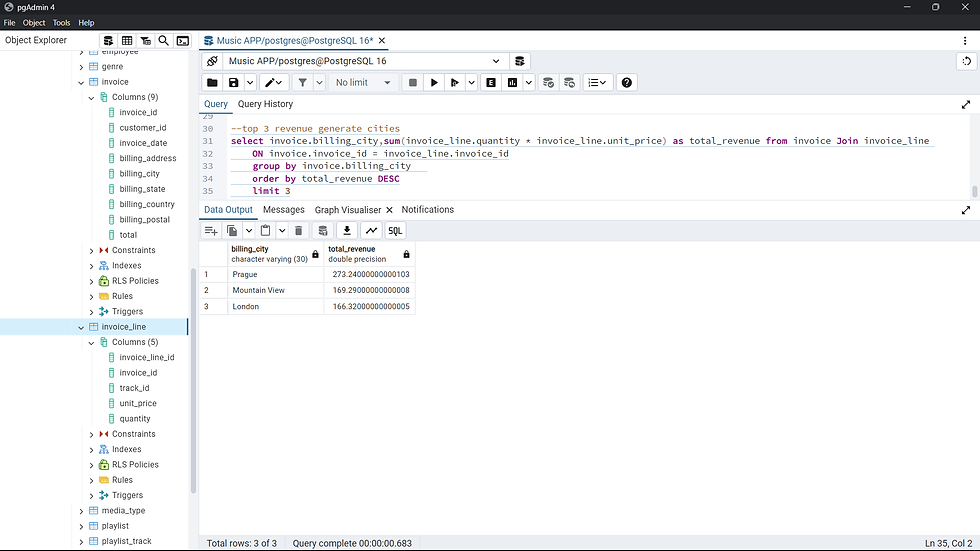
Result: potential cities to organize a musical concert that can ensure guaranteed participation are Prague, Mountain View & London
2. rock music listeners in alphabetical order for sending marketing emails.
We need to join tables customer, invoice (with customer_id) then join it with invoice line table using invoice id and join them with track & genre table using track_id. then select the customer's first name and last name and order it with the email where the genre is 'ROCK'

result: we can download this file using the store button and share it with concerned marketing people.
3. artists who have published the most rock music in our app.

This can be found using joining the Artist, album(with the artist), and join it with the Track table (using track_id) and club it genre table. Then order the artist name by the number of unique track_id.
first, we wrote a query to find the genre id of the rock music

Result: The top 10 artist who published most rock songs are
"Led Zeppelin"
"U2"
"Deep Purple"
"Iron Maiden"
"Pearl Jam"
"Van Halen"
"Queen"
"The Rolling Stones"
"Creedence Clearwater Revival"
"Kiss"
these are artists whom we should approach for performing in our concert.
You visualize your result using the 'Graph visualizer 'option in the output pane

Customer and Artist Understanding for Insights
Find how much money is spent by each customer on artists.
The query begins by linking the artist table to the album table via the artist_id, establishing the artist-album relationship. Next, it joins the album table with the track table using the album_id, connecting albums to their respective tracks. The track_id in the track table is then used to join with the invoice_line table, which details individual tracks purchased in invoices. The invoice_line.invoice_id is then connected to the invoice table, providing overall invoice information for each track purchase. Finally, the customer table is joined with the invoice table using the customer_id to identify the customer who made the purchase.
The `GROUP BY` clause groups the results by the `artist.name`, ensuring that the total spending is calculated for each unique artist.
Within each artist group, the `SUM` function is applied to the `invoice.total` column, calculating the total amount of money spent on that particular artist by summing up the individual invoice totals for all tracks by that artist.
The `MAX` function is used on `customer.first_name`, retrieving the first name (or last name if `MIN` is used) of a customer who contributed to the total spending on an artist. Since multiple customers might buy an artist's tracks, `MAX` provides the name of one such customer.
The `ORDER BY` clause sorts the results in descending order based on the `total_spent` (alias for the sum of invoice totals), presenting the artists with the highest total spending at the top of the results.

2. find the most popular music genre for each country.
for this we Built a Foundation (CTE):
A Common Table Expression (CTE) named genre_counts is established. This temporary result set calculates the purchase count for every genre in each country. It accomplishes this by joining tables like customer, invoice, track, and genre to create a comprehensive view of customer purchases and their corresponding genres.
Extracting Top Genres:
The main query leverages the genre_counts CTE. It groups the data by country and then employs a HAVING clause with a subquery. This subquery finds the maximum purchase count for each country within the CTE. The HAVING clause ensures that only rows where the purchase count matches the maximum for that country are included in the final results.
Finally, the query retrieves the country and uses the MAX function on genre (aliased as most_popular_genre) to identify the genre(s) with the highest purchase count in each country.

3. show top countries along with top customers and how much they spent.
CTE (top_spenders_per_country):
Joins customer and invoice tables to calculate the total spent by each customer in each country. Groups the data by country and customer_id, then sums the invoice totals for each customer within a country. Orders the results by country in descending order of total spending (highest spenders first).
Main Query:
Selects country, a concatenation of customer.first_name and last_name (aliased as customer_name), and total_spent from the top_spenders_per_country CTE.
Joins the CTE with the customer table again to retrieve full customer names.
Group the results by country, customer_name, and total_spent.
Uses a HAVING clause with a subquery to filter the results. The subquery finds the maximum total spent for each country within the CTE. The HAVING clause ensures that only rows where the total_spent matches the maximum for that country are included.

these are high-priority customers from each country thus each regional sales team should catch up and give necessary support and help to these customers.


Comments